Before paying for a DDownload account, most users want clear answers to two questions: How slow is DDownload Free mode in real life? And once you upgrade to Ultimate Premium, how fast can you download files in Chrome and JDownloader 2?
Instead of relying on rough estimates, we ran hands-on speed tests on a 1 Gbps fiber connection (plus a separate high-speed VPS session). Below you will find our real screenshots comparing free browser throttling against single-file Premium downloads, 4-file parallel Chrome transfers, and heavy JDownloader 2 queues.
DDownload Free vs Premium (Ultimate) at a Glance
See how the DDownload Ultimate Premium plan beats the Free plan across our real-world tests and official account limits:
| Feature | Free Plan | Ultimate (Premium) Plan |
|---|---|---|
| Tested Single-File Speed | 89.6 KB/s (Slow throttle) | 13.9 MB/s (~155x faster in Chrome) |
| Tested Parallel Speed | Not supported (1 file only) | ~44.5 MB/s (Chrome) / 113+ MiB/s (JD2) |
| Daily Download Limit | Strictly limited | 200 GB every day (6,000 GB/month) |
| Storage Space | 5 TB (30-day inactivity limit) | 100 TB to Unlimited (Extended retention) |
| Max File Upload Size | 2 GB | Up to 100 GB |
| Wait Times & Captcha | 30–60 second delay + Captcha | Starts right away (Direct download) |
| Annoying Ads | Yes (Pop-ups and banners) | Zero ads |
| Files at Once | Just 1 file at a time | Up to 10x parallel files |
| Resume Interrupted Files | Must start all over | Pick up right where you left off |
| Customer Support | Standard ticket queue | Fast 24/7 priority live chat & email |
Summary of Our Recorded Speed Test Sessions
| Test Environment | Recorded Speed | Test Details |
|---|---|---|
| 1. Free Browser Test | 89.6 KB/s | 48.0 MB ZIP file in Chrome (~9 mins wait) |
| 2. Premium Chrome (1 File) | 13.9 MB/s | Single 1.1 GB RAR archive (file4.rar) |
| 3. Premium Chrome (4 Parallel) | ~44.5 MB/s combined | Four 1.5 GB RAR parts (9.6 to 11.9 MB/s each) |
| 4. JDownloader 2 (4 Parts) | ~43.52 MiB/s combined | Four ~1.9 GiB RAR parts (8.52 to 13.39 MiB/s each) |
| 5. JDownloader 2 (Multi-Pack) | ~113.34 MiB/s combined | Four UHD 4K packages (10 active parallel streams) |
| 6. Separate European VPS Run | 123.78 MB/s combined | 13.08 GB archive package over a server route |
Note on units: Google Chrome reports speeds in decimal megabytes (MB/s), while some JDownloader 2 views use binary mebibytes (MiB/s, where 1 MiB/s ≈ 1.048 MB/s). We keep the exact numbers shown in each screenshot so you can verify every figure.
1. Free Browser Speed Test: 89.6 KB/s
In our free-mode test, we downloaded a small 48.0 MB ZIP file in Google Chrome without logging into a paid account. After waiting out the countdown timer, the transfer moved at just 89.6 KB/s, with Chrome estimating 9 minutes left.
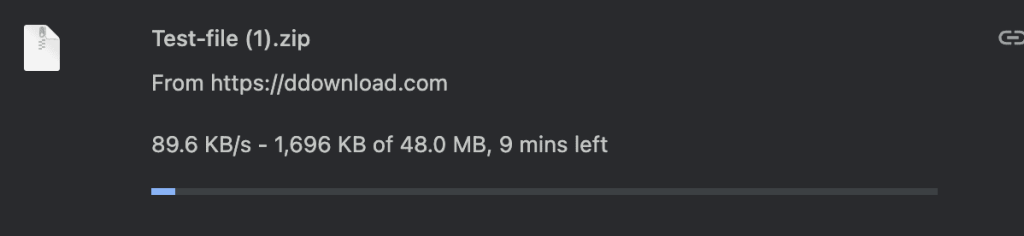
At 89.6 KB/s, a 1 GB file takes over 3 hours to finish. While free mode works for a tiny document, it is far too slow for large archives or multi-part downloads.
2. Premium Chrome Single-File Test: 13.9 MB/s (155x Faster)
Switching to an active DDownload Ultimate (Premium) account on the same 1 Gbps fiber line made an instant difference. A single 1.1 GB RAR file (file4.rar) started with zero waiting time and ran at 13.9 MB/s (~111 Mbps).
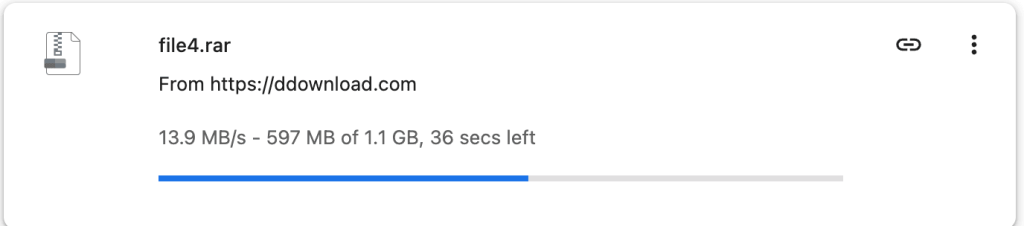
Instead of waiting over three hours per gigabyte, our 1.1 GB archive finished in well under a minute and a half.
3. Four Parallel Chrome Downloads: ~44.5 MB/s Combined
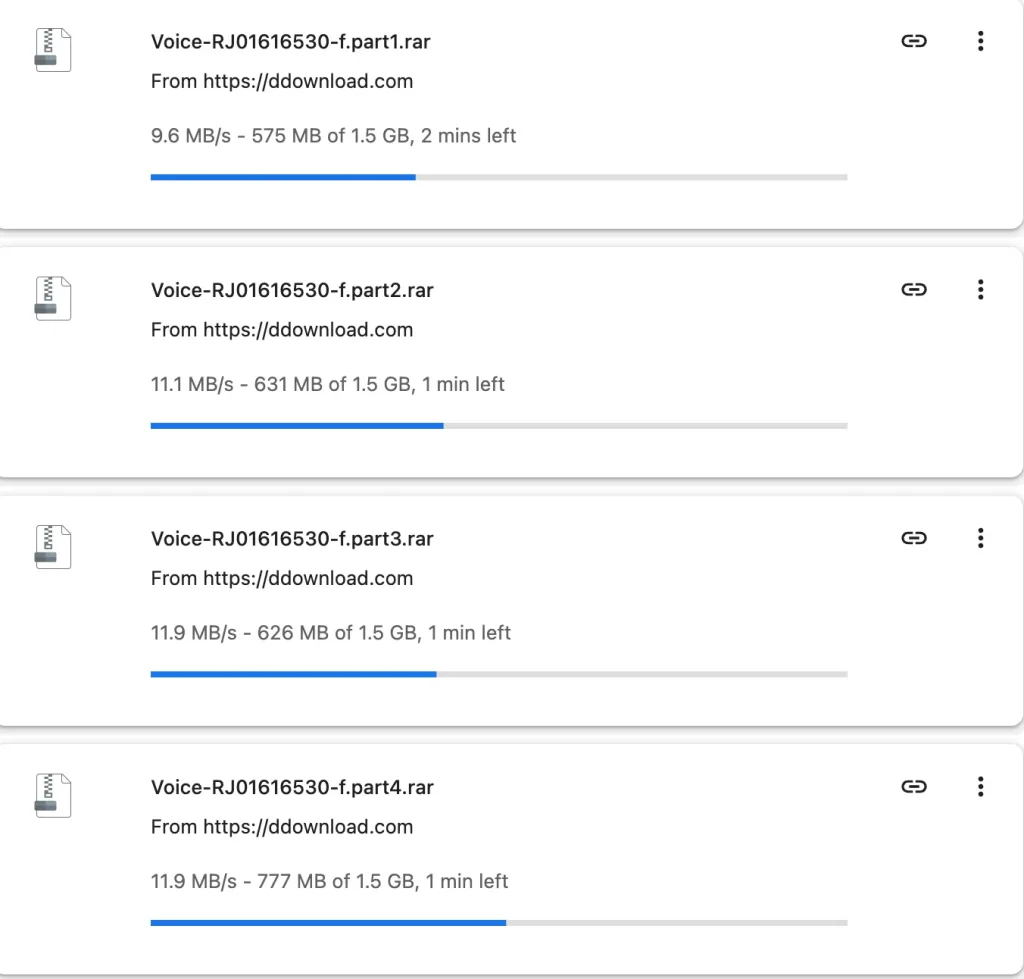
A single DDownload stream typically tops out around 10 to 14 MB/s per file path. To use more of our 1 Gbps fiber connection, we started four 1.5 GB RAR parts at the same time in Chrome. The four streams ran at 9.6 MB/s, 11.1 MB/s, 11.9 MB/s, and 11.9 MB/s—giving us a combined speed of ~44.5 MB/s (~356 Mbps):
4. JDownloader 2 Speed Tests: 43.5 MiB/s up to 113.34 MiB/s
For split RAR archives and big queues, JDownloader 2 is the best companion for a DDownload Premium account. First, we tested four active RAR parts (~1.9 GiB each), which ran at 13.39, 11.05, 10.56, and 8.52 MiB/s—a combined speed of ~43.52 MiB/s:

Next, we loaded four UHD 4K archive packages (~5 GiB each) with 10 parallel streams active at once (~11.9 MiB/s per part). The four packages reached 34.93, 35.87, 31.81, and 10.73 MiB/s—pushing total throughput to 113.34 MiB/s and nearly saturating our 1 Gbps line:

5. Separate High-Speed VPS Test: 123.78 MB/s
To see how DDownload performs over a direct data-center route, we also ran a 13.08 GB package on a high-bandwidth European VPS. That session reached 123.78 MB/s combined, showing how fast DDownload servers can deliver data when network routing is optimal:

How to Get the Fastest Speeds in JDownloader 2
- Log in to DDownload.com in your browser and enable Direct Downloads in your account settings.
- Open JDownloader 2, go to Settings → Account Manager → Add, and enter your DDownload Premium login details.
- Set Max Simultaneous Downloads to 4–8 files. Since each file stream runs around 10–14 MB/s, running 4 to 8 files in parallel is the best way to max out a fast fiber line.
Speed Test Verdict: Which Plan Should You Pick?
Our tests make the choice simple. Free mode is throttled to ~89.6 KB/s, while DDownload Ultimate Premium jumped to 13.9 MB/s on a single file and 44.5 MB/s to 113+ MiB/s with parallel downloads—plus a massive 200 GB daily traffic allowance.
- 1-Month Plan (€9.99 subscription / €14.99 one-time): Great for a quick test on your own home connection or a single download project.
- 1-Year Ultimate Plan (€39.99 / year): Just €3.33 a month! This plan saves you 67% and is the best deal for regular users.